

Email Management
Use Settings > Email Management to configure tenant email addresses for inbound and outbound customer conversations.Emails where your channel is copied
CXP checks the email’s To recipients against the receiving channel address and the valid tenant and selected-channel Default From Addresses. If any appears in To, ordinary conversation processing applies. If none appears, CXP stores the email and assigns an unassigned conversation to All Agents, without an automatic Concierge Agent reply. This applies to both new and existing conversations; an existing agent or team keeps ownership. For example, mail delivered tosupport@channel.example with default From
help@example.com, To legal@example.com, and CC help@example.com goes to
human handling. BCC delivery and an empty To list follow the same rule. A trusted
forwarding alias or another configured channel in To does not qualify unless
it matches the receiving channel, tenant default, or that channel’s own default.
Find All Agents work in Unassigned and take ownership before replying.
A later email addressed directly to the channel does not remove an existing
assignment. This explicit All Agents assignment does not select a Ready agent
through direct email routing. Configured notification emails still apply.
Disabled receiving addresses retain their disabled-address behavior.
Prerequisites
You need administrator permissions for channel management.Email addresses
Each configured address routes inbound email to a tenant and a Concierge Agent. Administrators can create, edit, enable, disable, and delete configured addresses according to tenant policy.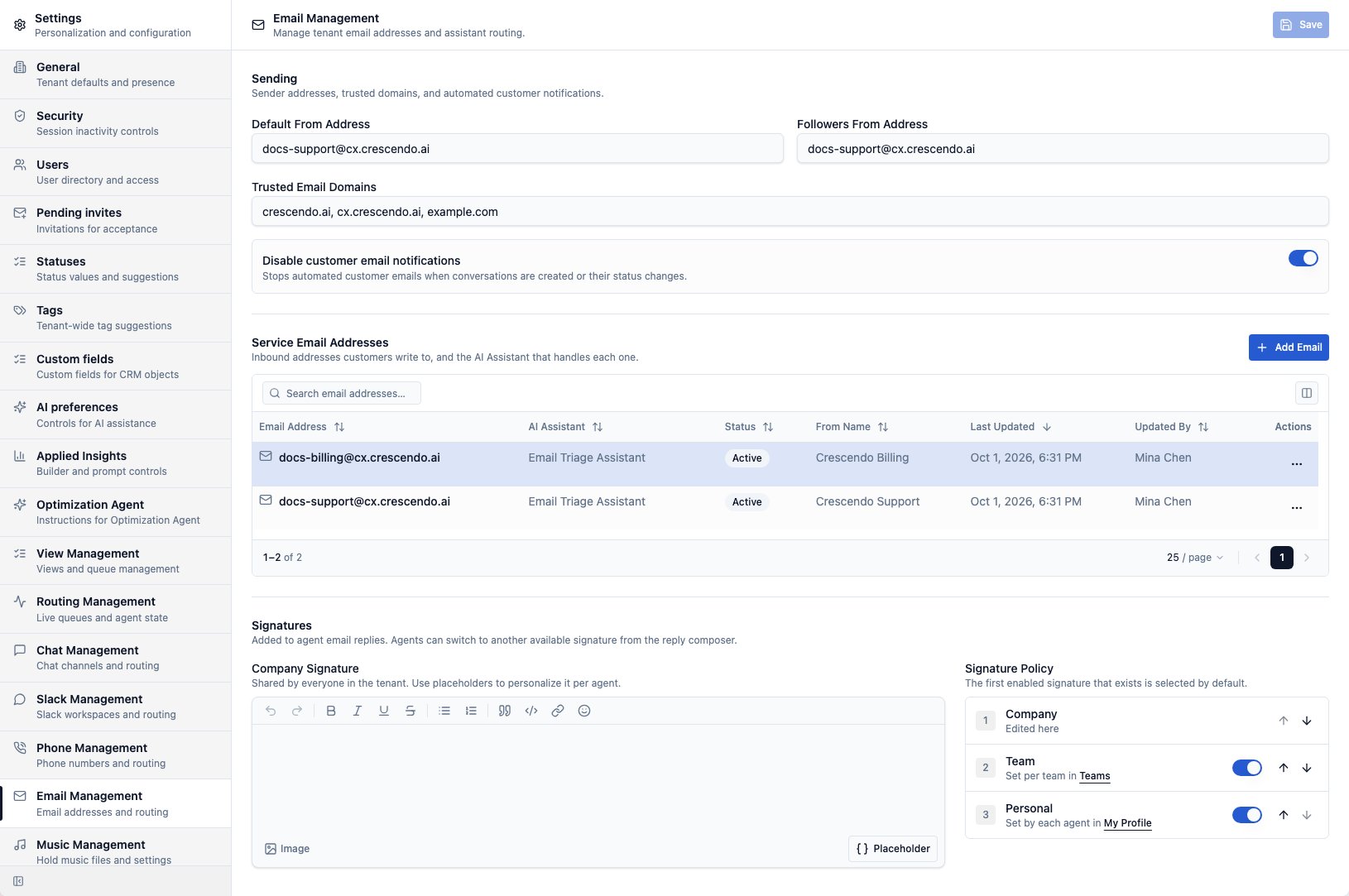
Assign a Concierge Agent
Choose the Concierge Agent that should handle inbound email for the address. The agent should have email-appropriate instructions, knowledge, categories, and handoff behavior.Configure sender identity
Email Management can include sender settings such as:- From display name
- Default From address
- Followers From address for internal follower notifications
- Trusted domains when customer-domain forwarding is used
Set the sender for Concierge Agent email
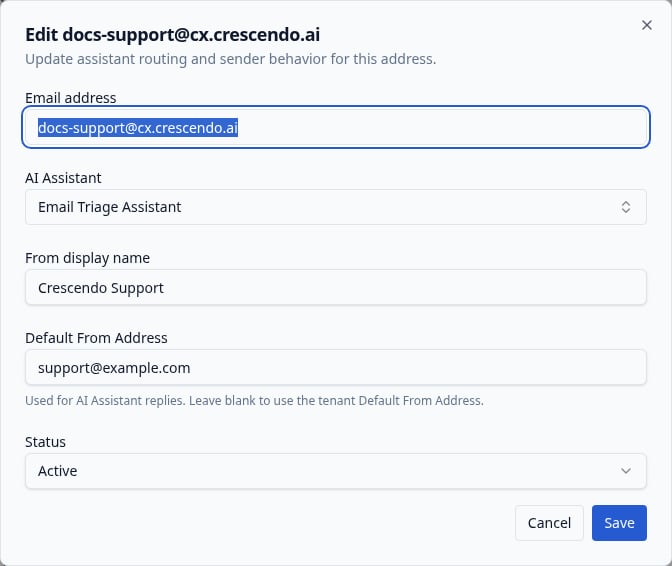
Set the tenant Default From address as the fallback for Concierge Agent email replies. To use a different sender for one channel, add or edit its service address and enter Default From Address directly below From display name. Leave it blank to inherit the tenant default, or clear a saved value to restore inheritance. Select Save in the dialog. For example, the Orders channel can useorders@example.com while other channels
inherit support@example.com. Every newly prepared bot response for that channel
uses its default, including direct, forwarded, existing-thread and rejection
replies. The From display name still comes from the channel configuration.
Keep CXP addresses out of automatic recipients
CXP removes its configured mailboxes from To, CC, and BCC when preparing Concierge Agent replies, customer and team/follower notifications, and disabled-address replies. This includes every registered email address, even disabled addresses, plus channel Default From Addresses (including disabled channels), the tenant Default From address, and the Followers From address. The email’s actual From address is also excluded. Matching ignores capitalization and display names. Other addresses on the same domain remain eligible; distinct plus addresses remain distinct. Register any forwarding aliases that should be excluded using your existing email settings. If no eligible To address remains, CXP does not send the email or promote a CC or BCC recipient. A retained Concierge Agent reply shows Not sent in the timeline. If the configuration cannot be read, automatic sending stops for that preparation with a configuration error. When preparing a Concierge Agent reply, CXP still saves the incoming customer email in the conversation so an agent can respond. The withheld automatic reply is not retried automatically. Saved configuration changes affect newly prepared emails. Emails already prepared, including provider retries, keep their prepared recipients. This policy applies to automatic responses; agent-authored replies and forwards keep their current recipient validation.Control automated customer notifications
Use Disable customer email notifications to stop automated emails that CXP sends when a conversation is created or its status changes. The switch is on by default, including when a tenant has not saved the setting yet. Turning this switch on does not change existing email conversations or prevent customers and agents from exchanging real email messages. It only suppresses the automated conversation notifications. Turn the switch off when customers should receive those notifications, then select Save. Coming soon: Replies to previously sent customer notifications will use the same thread recovery as other customer email, even when new notifications are disabled. Recovery requires references that identify one verifiable stored thread. This applies to both Simple and Advanced conversation modes.Prevent automatic acknowledgment loops — Coming soon
CXP will ignore incoming emails whoseX-Auto-Response-Suppress header includes
AutoReply or All, regardless of capitalization. For example, a ticket-system
acknowledgment with DR, RN, OOF, AutoReply will not start an AI turn, create
customer activity, or trigger notifications or disabled-address replies.
This applies in both Simple and Advanced modes without an additional setting.
The sender address is not blocked. A legitimate escalation from the same sender
can still be processed when it does not include a matching suppression token.
Auto-Submitted alone does not block an email. Unmarked automatic responses can
still cause loops; this check depends on the sender including the suppression header.
Recognize returned copies of outgoing email
If forwarding sends a CXP email back to a registered service address, CXP ignores the copy when its ownMessage-ID matches a retained outgoing email
in your tenant. This covers Concierge Agent and agent emails, forwards, and
customer, follower, and team notifications, including emails from closed
conversations. It works in Simple and Advanced modes without a new setting.
A recognized copy creates no customer activity, attachment upload, AI turn,
notification, or reply, including when it arrives at a disabled address.
A genuine reply with a new Message-ID continues through normal handling,
even when it references an earlier CXP email.
Recognition depends on the outgoing identity still being stored and preserved
by the forwarding system. Deleted records, unrecorded outgoing mail, or a
rewritten Message-ID cannot be recognized this way. Static replies from
disabled addresses rely on their existing X-Auto-Response-Suppress: All
header; they are outside this identity check if that header is removed.
Assign escalated emails directly to agents
Open Settings → Routing Management → Config. Directly below Routing offer notification sound, turn on Enable email assignment to agents, then select Save. This tenant-wide option is off by default. CXP selects the team using its category mappings and assigns new escalated emails to that team’s longest-waiting Ready agent. Not Ready and Off Duty agents are not selected. Email uses this waiting order independently of the team’s live-offer routing policy; it does not use cascade routing or a capacity limit.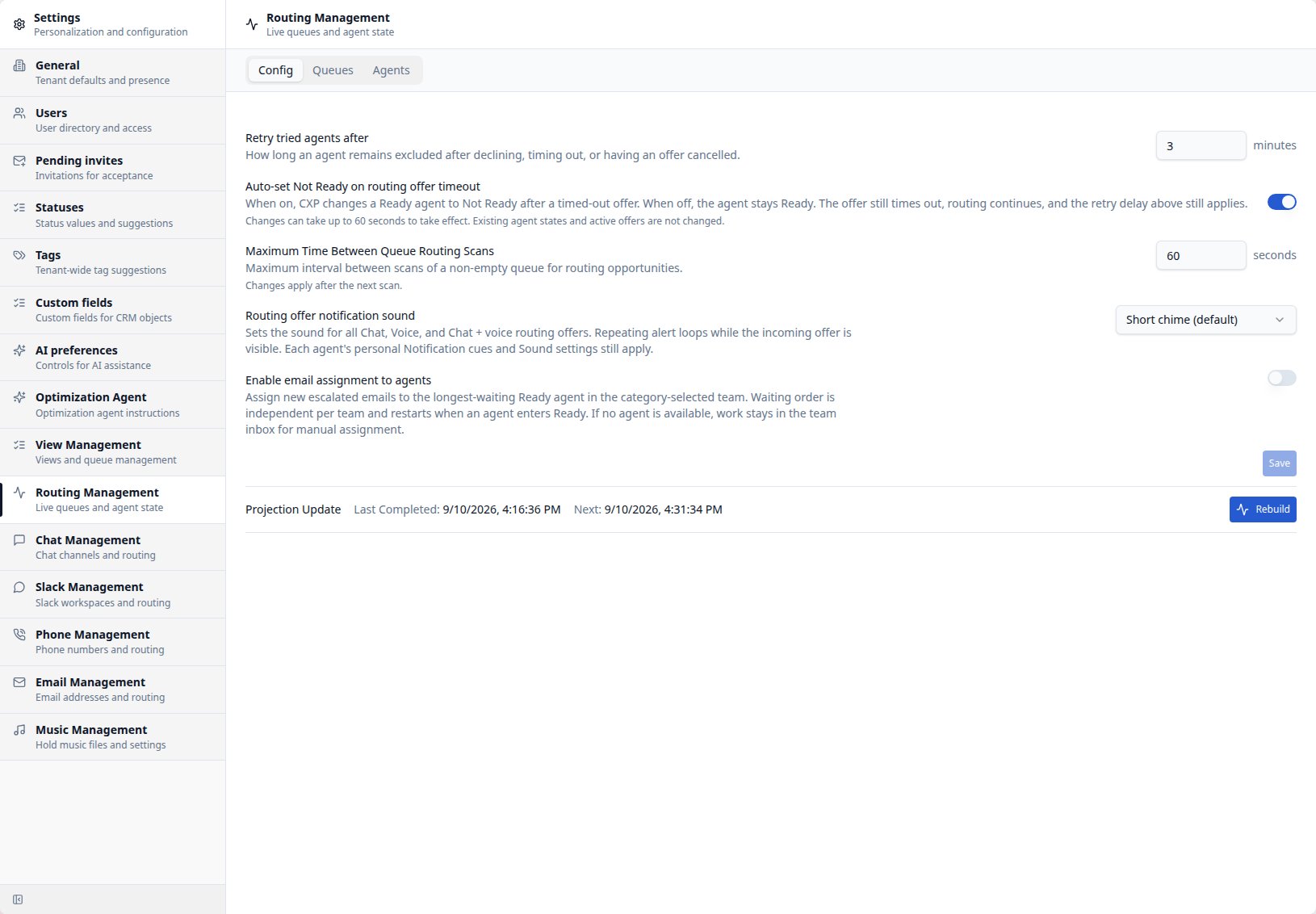
Configure email signatures
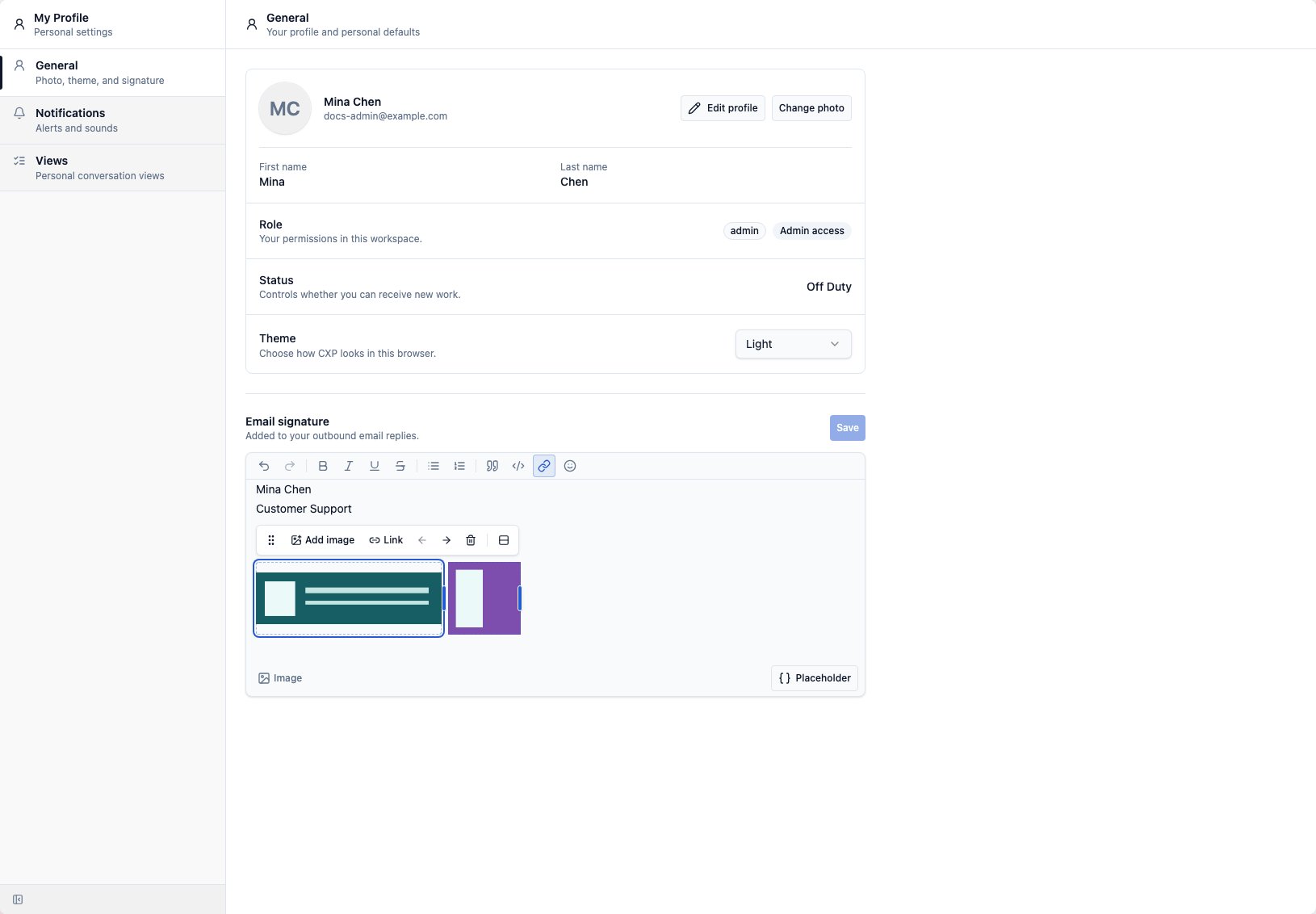
Configure your company signature and signature policy here. Configure team signatures in Teams > selected team > Settings > Email Signature, and your personal signature in My Profile > General > Email signature. Coming soon: Each row in the signature policy links directly to where that signature is edited (Teams or My Profile > General), and a single Save button at the top of the page saves sender settings and signatures together. The Profile link scrolls to your personal signature section. Only changed settings are submitted. If one part fails to save, its changes remain available for retry; other parts may already be saved. Coming soon: Company and team signature configuration is Owner/Admin-only. Team Leads keep their personal signature and can apply permitted signatures to customer replies, but cannot edit team signatures or their configuration assets. Signature editors support inline logo and image sizing. Select or hover an image to reveal its right-edge resize handle, then drag to choose a fixed pixel width. Use Reset in the image controls to return to responsive percentage sizing. The configured size is retained when an agent applies the signature to an email reply. To make a logo or social icon clickable, select or hover the image and choose Link in its image controls. Enter anhttp, https, or mailto
destination, then select Apply. Open the same image control again to edit or
remove the destination. The formatting-toolbar Link action also works for a
selected image. CXP retains safe image links when you paste a linked image into
the signature editor. Send a test reply and select each image in the delivered
email to confirm that it opens the intended destination.
To place logos, banners, or other images beside one another, upload the first image and choose
Add image beside in its image controls. Select one or more additional
images. Each image sits in its own resizable grid cell with consistent spacing.
Select an image to show the row controls. Drag the rightmost handle to resize
the entire row proportionally, or a divider between images to adjust neighbouring
cell widths. Images retain their proportions and fit inside their cells.
Link, the left/right arrows, and Delete apply to the selected image.
Add image appends another cell; Split image row puts each
image back on its own line. Each image keeps its own destination, and row edits
can be undone. Save the signature when finished.
Enable or disable an address
Enabled addresses can route inbound email into CXP. Disabled addresses remain configured but do not process inbound messages as normal conversations. When supported, configure disabled-address auto-reply text so senders receive a clear response while the address is disabled.Attachments and delivery status
CXP stores inbound and outbound email attachments in tenant-owned storage and shows their attachment controls in the conversation timeline. For bot-owned inbound email, the assigned Concierge Agent’s existing file-upload and attachment-analysis settings govern whether supported images and PDFs are analyzed before it responds. Email Management continues to own address routing and attachment storage; it does not add a separate analysis switch. Delivery status depends on provider events and may update after the agent sends the email.Test after changes
After changing email configuration:- Send a test email to the configured address.
- Confirm the email creates or updates the expected conversation.
- Confirm the assigned Concierge Agent or routing behavior is correct.
- Confirm the customer notification behavior matches the switch setting.
- Send an agent reply from an assigned conversation.
- Confirm outbound sender identity and delivery status.