

Teams, routing, and categories
Teams and categories control how CXP routes live customer work to the right group of agents. Coming soon: Team, category, routing/music and team-signature configuration is Owner/Admin-only. Team Leads retain assignment actions, team notifications and Agent Workload. Required operational lookup data remains available without configuration access.Prerequisites
You need an administrator, owner, or team-management role with permission to manage teams and routing settings.How routing fits together
CXP routing uses several pieces of configuration:- Teams group agents for ownership and routing.
- Categories classify what a conversation is about.
- Category mappings connect top-level categories to general teams.
- Routing policy decides how eligible agents receive work.
- Agent readiness determines who can receive live offers.
Team types
CXP includes a required All Agents team. This team represents the tenant-wide fallback pool and is system managed. Administrators can create general teams for operational groups such as Billing, Technical Support, or VIP Support. General teams can be mapped to top-level categories and can configure routing behavior.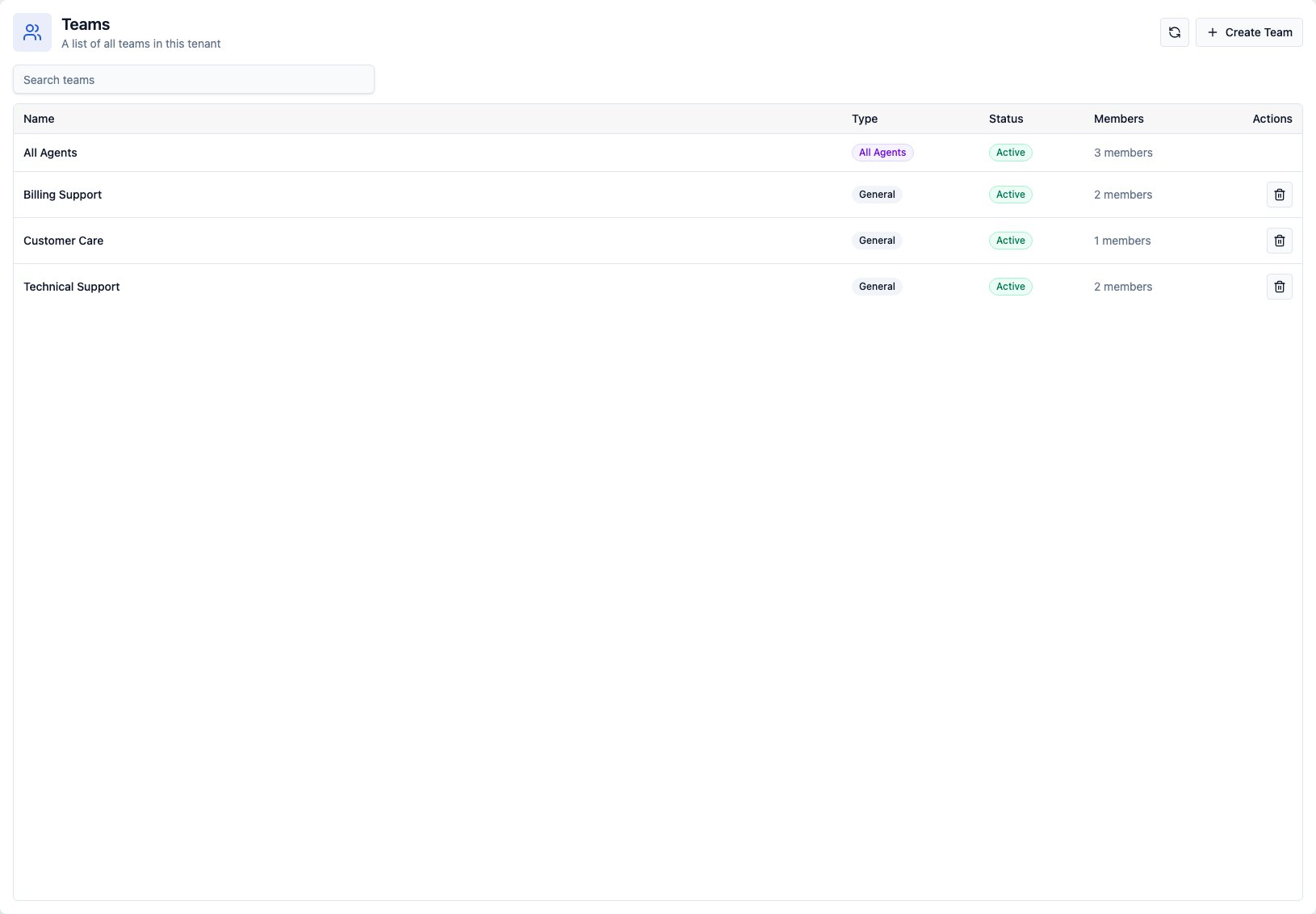
Manage team membership
From the Teams workspace, open a team to manage:- Team name and basic settings
- Active state
- Members
- Member routing eligibility
- Routing policy
- Category mappings
- Cascade routing, when enabled
- Team music settings for voice queues, when configured
Configure routing policy
Team routing policy controls how CXP selects an eligible agent for live offers. Supported policies include:- Round robin to rotate offers across eligible agents.
- Least loaded to prefer eligible agents with lower current load.
Configure team inbox notifications
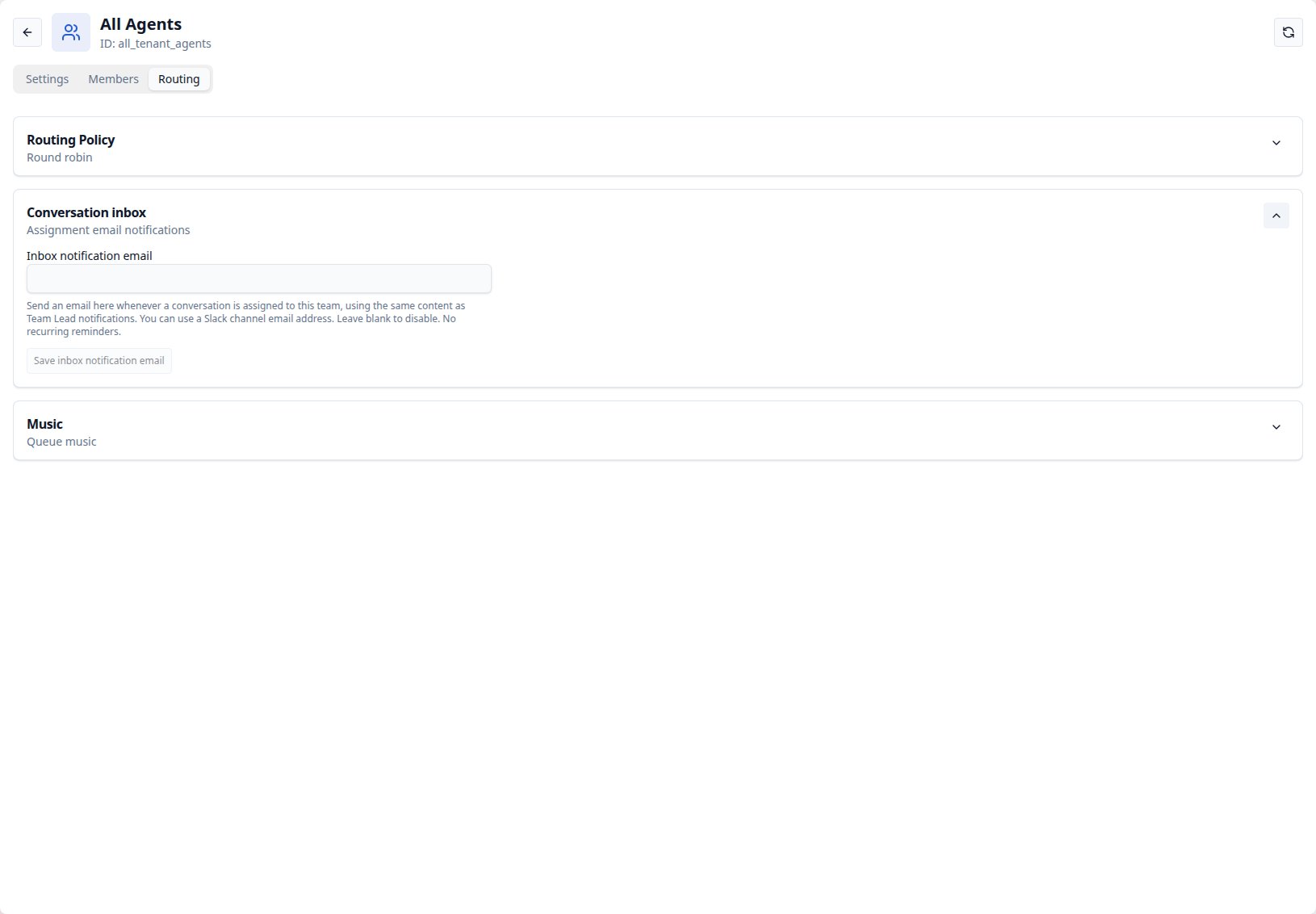
Every team, including All Agents, automatically has a team conversation view. This is its inbox of Open, team-owned conversations awaiting manual assignment. Team Leads use the view to assign waiting work to individual agents.- Open Teams, select the team, and select Routing.
- Expand Conversation inbox.
- Enter one Inbox notification email, then select Save inbox notification email.
- Clear the field and save to stop sending future notifications to that address.
Configure tried-agent retry timing
Open Settings → Routing Management → Config and set Retry tried agents after in whole minutes. The default is 3 minutes, and the supported range is 1 to 1,440 minutes. When an agent declines an offer, an offer times out, or an administrator cancels an active offer, CXP temporarily excludes that agent from the same conversation. Reaching the configured time does not immediately create a new offer. The agent becomes eligible during the next ordinary routing pass. Use the queue’s Run action when you need an immediate pass. A saved change can take up to 60 seconds to reach every routing instance. It applies only to exclusions created afterward; existing retry times do not change.Configure agent state after an offer timeout
Open Settings → Routing Management → Config and use Auto-set Not Ready on routing offer timeout. This setting is on by default. When the setting is on, CXP changes a Ready agent to Not Ready after the agent does not answer a Chat, Voice, or combined routing offer before it expires. When the setting is off, the agent stays Ready for other work. The offer still times out, the conversation returns to routing, and the retry exclusion above still applies. A saved change can take up to 60 seconds to reach every service instance. Saving does not change existing agent states or active offers.Configure queue recovery scan timing
Open Settings → Routing Management → Config and set Maximum Time Between Queue Routing Scans in whole seconds. The default is 60 seconds, and the supported range is 15 to 3,600 seconds. This setting is the maximum interval between scans of a non-empty queue for routing opportunities. Use a shorter value for faster scans or a longer value to reduce background scan frequency. Changes apply after the next scan.Configure routing offer notification sound
Open Settings → Routing Management → Config and use Routing offer notification sound to choose how CXP announces new live offers:- Short chime (default) plays once when a new offer appears.
- Repeating alert loops while the incoming offer remains visible.
Manage categories
Administrators manage category catalogs in the Categories workspace. A catalog can contain a hierarchy such as:- Top-level category
- Subcategory
- Sub-subcategory
Map categories to teams
Map top-level categories to active general teams from team routing settings. When a conversation is categorized:- CXP identifies the top-level category.
- CXP checks whether that category maps to an active general team.
- If a mapping exists, the conversation routes to that team’s queue.
- If no valid mapping exists, the conversation routes to All Agents.
Route by conversation category — Coming soon
New email, chat, and voice routing decisions will use only the conversation category, which describes the customer’s issue, such as Finance or HR. Handoff categories describe why human help was requested and remain available for reporting. They will not select a team, even when no conversation category is available. For example, a Finance conversation with an IT handoff category will route to the team mapped to Finance. If the conversation category is missing or has no valid team mapping, email uses its configured default team, then All Agents; chat and voice use All Agents. Optional email assignment to a Ready agent still selects that agent from the chosen team. The correction will apply to new routing decisions. Already queued work and retries of completed routing decisions keep their existing selection.Configure cascade routing
Cascade routing can expand eligibility when work waits too long in a team queue. A general team can define stages such as:- Start cascade after a configured delay.
- Add one or more extension teams.
- Include All Agents as a later fallback stage.
Operational checks
Before enabling a new routing setup:- Confirm agents are active and assigned to the intended teams.
- Confirm agents can set themselves Ready.
- Confirm category mappings cover the intended work.
- Confirm unmapped work safely falls back to All Agents.
- Test a live chat or voice offer before relying on the configuration in production.