

Transfer a live conversation
Use Transfer to hand your part of a live conversation to someone else. Once the target accepts and is ready, CXP completes the handover automatically. All included Chats move together. For Voice, CXP also confirms your disconnection before reporting success. For example, Alice transfers a customer’s Chat and Voice call to Bob. Bob accepts and connects Voice. The handover gives Bob Chat access and removes Alice from both media. Alice initially sees Transferring…. If disconnection remains unconfirmed when its safety cutoff is reached, the status becomes Status unavailable.Before you transfer
- The Transfer control is disabled when the participant list shows more than two people, with Transfer is unavailable during a conference. A customer active in both Chat and Voice counts once. Existing invitations continue under their normal rules; this control does not cancel a request already sent.
- Participate in every active Chat and be connected to the conversation’s Voice call, when present. You can transfer your participation even when another agent owns the conversation.
- Internal Transfer requires permission to read, reply and assign conversations. The conversation can be Open or Pending.
- Choose an eligible Online agent who is not already participating. Ready, Not Ready and Off Duty agents can receive a direct invitation. Voice acceptance requires the target to be available for this call.
- Transfer includes every active Chat and the supported single-room Voice call. Calls using separate translation rooms are not supported.
Transfer to an agent
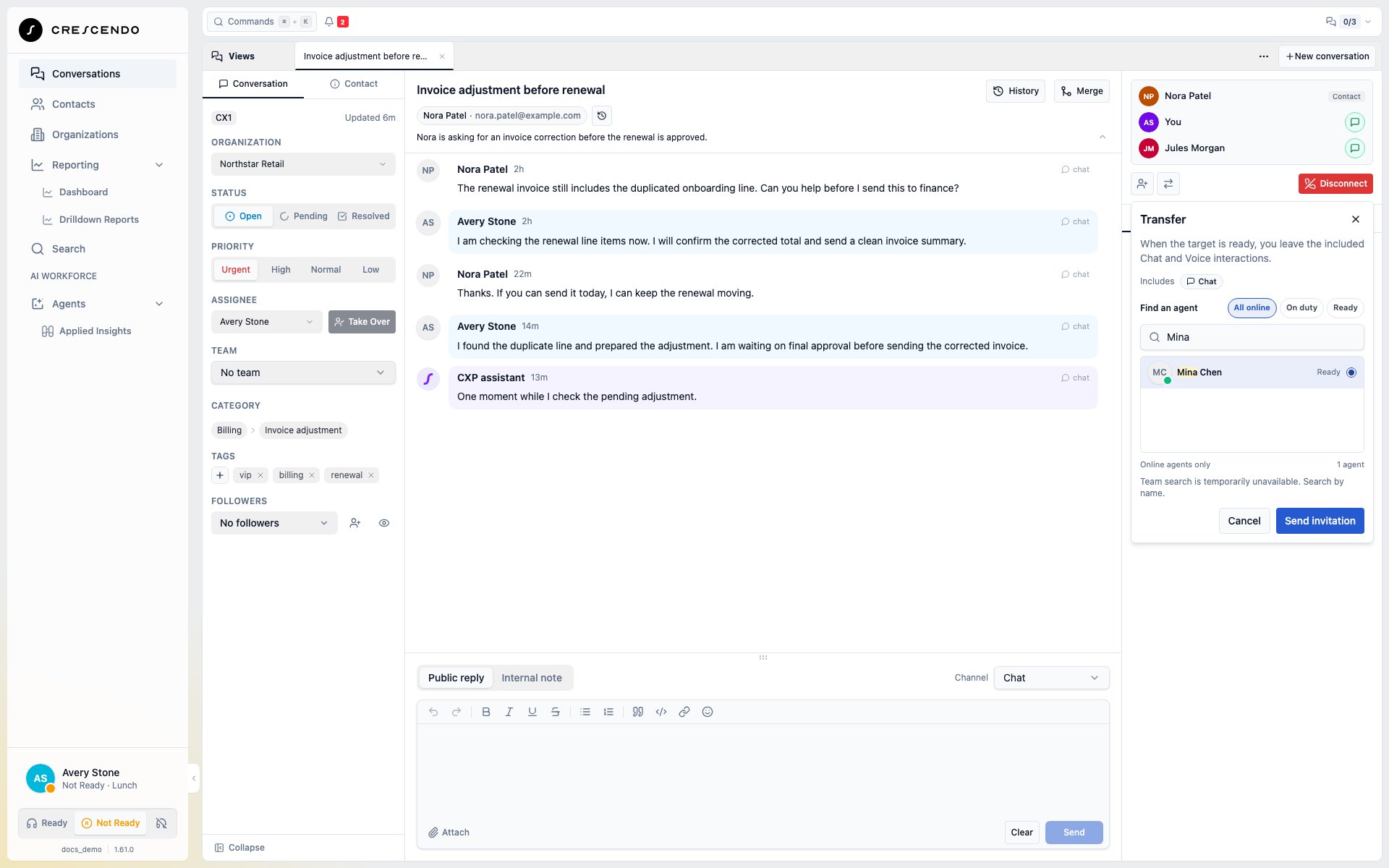
- Open the conversation and select Transfer beside the media controls.
- Search by name or team. Use All online, On duty or Ready to narrow the list, then select one agent.
- Check the included media and select Send invitation.
- The recipient selects Accept in the Transfer invite banner. For Voice, microphone access and connection happen in the browser where they accepted.
- Wait for Transferred to Bob or Transfer complete. There is no separate Complete action.
When the media changes before acceptance
An invitation includes the Chat and Voice active when you send it. If the customer adds Voice before the recipient accepts a Chat invitation, the old invitation is unavailable. Once your view knows about the change, Invite unavailable explains why; the recipient sees This invitation is no longer available. Its countdown and waiting count disappear, and the reason stays visible after the reply deadline. You can recover immediately: select Cancel while offered, select Join Call to connect Voice, then send a new Transfer invitation and review its included Chat + Voice. After the old reply window ends, use the new invitation controls when available. Nothing is resent automatically. Dismissing a notice only hides it for you; it does not cancel the invitation or disconnect the customer. If CXP cannot confirm an earlier Accept, use Check result instead. An unanswered request is different from a confirmed rejection. If acceptance was rejected because you were on another call, you can retry after leaving that call while the invitation remains valid.What happens to assignment
Assignment describes who owns the case; it does not grant permission to rejoin a
call. A later departure does not automatically choose a new owner. Use ordinary
assignment controls for a separate authorized reassignment.
Transfer to an external number
External Transfer is available for an Open, Voice-only conversation when outbound calling is enabled and configured. Select Contact and a saved number, or select Phone number and enter a number with its country code. Check the displayed Caller ID. A sole configured caller ID is selected for you; choose explicitly when several are available. Calling is blocked when none is configured. Voicemail or an automated system may answer. The external endpoint does not Accept a CXP invitation. Handover proceeds when its call is ready. You can cancel the external attempt until handover wins; an already completed handover cannot be undone by Cancel. The customer and external party can continue after your departure. Brief background processing does not immediately end an answered external call. CXP can briefly retry the handover while keeping the same phone connection and checking that the transfer is still valid. Wait for the transfer result; you do not need to dial again. Cancellation and the original transfer time limit still apply.Understand the result
- Transferring…: handover is progressing and Voice removal is being confirmed.
- Transfer complete / Transferred to Bob: the handover and required Voice disconnection are confirmed.
- Handover saved; disconnection is unconfirmed: the handover is saved, but current removal evidence is unavailable. Keep the connection warning in view.
- The call ended for safety: CXP ended the affected Voice call because it could not confirm the required disconnection in time. Surviving Chat and the committed assignment remain in place.
- Status unavailable: the result cannot be confirmed. Select Check result; use Check connection status for current participation. Do not resend merely because the earlier result is unavailable.